

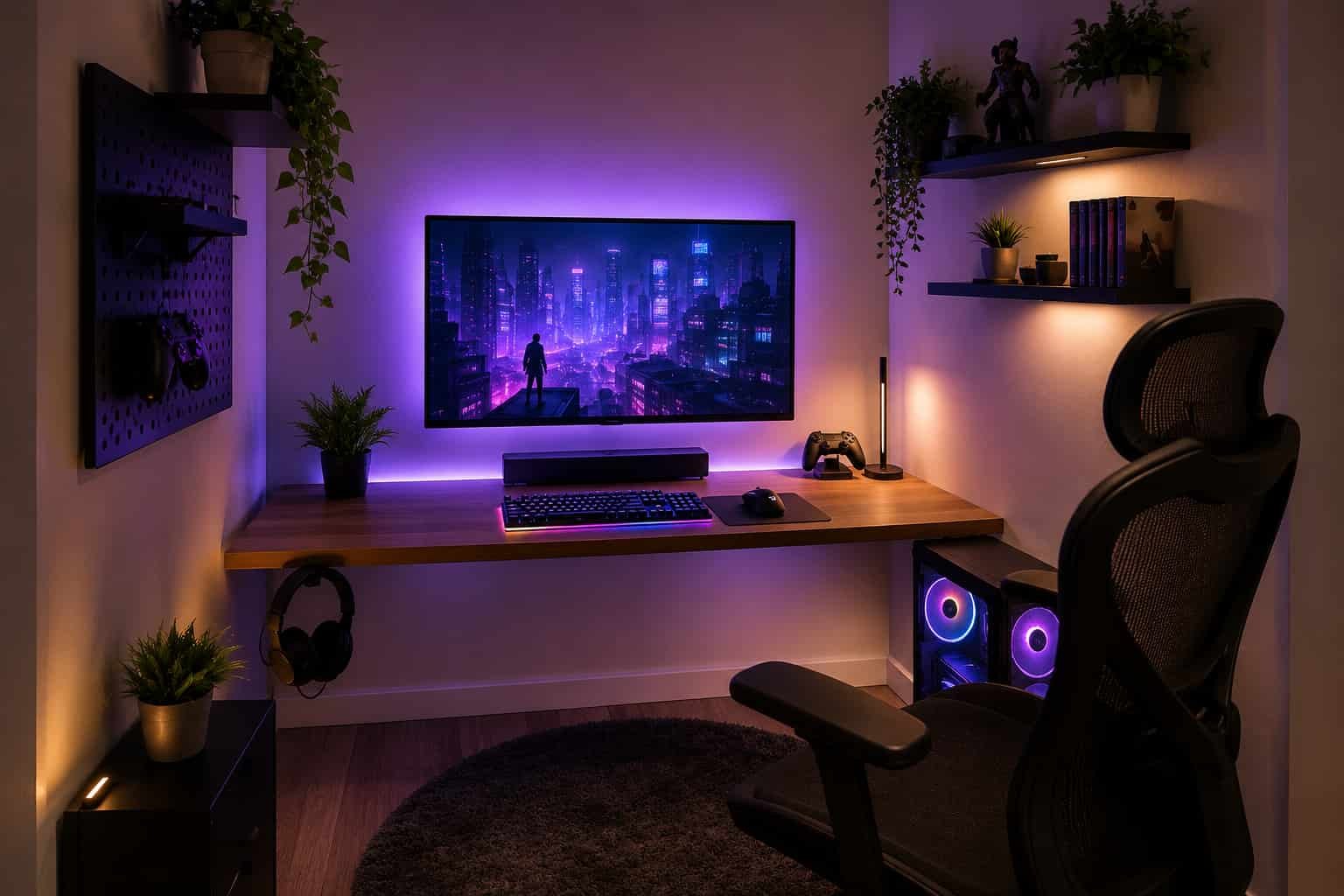
I used to think having a small bedroom automatically meant giving up on the dream gaming setup.
My first setup was squeezed into a tiny corner beside my bed with barely enough room for a mousepad. The monitor felt too close to my face, cables were everywhere, and my chair constantly bumped into the wall. Honestly, it looked more stressful than relaxing.
But after researching compact gaming setups, testing space-saving ideas, and seeing how real people optimized tiny rooms online, I realized something important:
A great gaming setup is more about smart organization than having a huge room.
In fact, some of the coziest setups I’ve seen were built inside tiny bedrooms, apartments, and awkward corners using affordable furniture, wall storage, and clever cable management.
If you’re trying to build a cheap gaming setup in a small room, this guide will help you create a setup that feels comfortable, clean, and surprisingly spacious — without spending a fortune.
Overview:
How to Build a Cheap Gaming Setup in a Small Room
Small gaming rooms work best when every inch of space has a purpose.
Many budget-friendly gaming setups use:
- Compact 39–44 inch gaming desks
- L-shaped corner desks
- Wall-mounted monitors
- Floating shelves
- LED light strips
- Vertical storage solutions
The main goal is to keep the floor clear while maximizing desk space and comfort.
Affordable upgrades like:
- Monitor arms
- Under-desk cable trays
- Wireless peripherals
- Soundbars
- Headset hooks
…can completely transform a cramped setup without requiring expensive furniture.
In my experience, using vertical wall space makes the biggest difference in tiny rooms because it instantly reduces visual clutter.
📌 Important Tip
If you’re working with limited space and trying to save money, learning how to Computer Hardware build a smart setup starts with choosing the right parts, so don’t miss our guide to Build a Budget Gaming PC for beginner-friendly recommendations.
Why Small Gaming Rooms Feel So Cramped
Before upgrading my setup, I kept making one huge mistake:
I was thinking horizontally instead of vertically.
Most beginners try to fit:
- A giant desk
- Multiple speakers
- Large monitor stands
- Full-sized PC towers
…inside a tiny bedroom.
That quickly creates:
- No legroom
- Cable clutter
- Overcrowded desks
- Poor airflow
- Uncomfortable monitor distance
The solution is not necessarily buying expensive furniture.
It’s about:
- Using wall space
- Choosing compact accessories
- Reducing unnecessary clutter
- Keeping the setup minimal
Start With the Right Desk
Compact Gaming Desks Work Better Than Oversized Ones
One of the best upgrades I made was downsizing my desk.
At first, I thought bigger desks automatically meant better setups. But in small rooms, oversized desks usually waste space and make the room feel tighter.
Many small-room gamers recommend:
- 39–44 inch desks
- Compact L-shaped desks
- Floating desks
- Corner desks
Why L-Shaped Desks Work So Well
L-shaped desks maximize awkward corners that normally go unused.
Some budget options even include:
- Built-in shelves
- Cup holders
- Headphone hooks
- Under-desk storage
This keeps accessories off the main desk surface and creates more usable space for gaming.
Brands like IKEA are popular for affordable compact desk setups because many of their furniture pieces work well in tiny rooms.
Wall-Mount Your Monitor to Instantly Save Space
This was probably the biggest game changer for me.
Most monitor stands eat up valuable desk space without people realizing it.
Using a:
- Wall mount
- VESA mount
- Monitor arm
…frees up a surprising amount of room.
Popular options include:
- VESA Wall Mount
- Monitor clamp arms
- Thin-profile wall mounts
In my experience, wall-mounting a monitor immediately makes a small setup feel cleaner and less cramped.
Choose the Right Monitor Size
A huge monitor sounds exciting until you place it 60 cm away from your face.
Many experienced small-room gamers agree:
- 24-inch monitors are ideal
- 27-inch monitors are comfortable
- 32-inch monitors can feel overwhelming in tiny rooms
If your desk depth is limited, a smaller monitor often creates a much better gaming experience.
Best Small Room Monitor Setup
- Single monitor
- Thin bezels
- VESA compatibility
- Adjustable mount
That combination saves both space and frustration.
Use Vertical Space Like a Pro
One thing I noticed while researching cozy gaming setups is that the best small rooms always use vertical storage.
Instead of crowding the desk, people use:
- Floating shelves
- Pegboards
- Wall panels
- Narrow bookcases
- Vertical storage bins
Great Things to Store Vertically
- Controllers
- Headsets
- Collectibles
- Games
- Chargers
- Small speakers
This keeps the setup visually clean while adding personality.
A Mini ITX PC Can Save a Ton of Space
Traditional PC towers are huge.
If you’re building a compact setup, consider:
- Mini ITX PC
- Small form factor cases
- Compact gaming PCs
A Mini ITX setup takes up far less desk and floor space while still delivering strong gaming performance.
Some people even:
- Wall-mount their PC
- Place it on shelves
- Use under-desk mounts
I was skeptical at first, but smaller PC cases genuinely make tiny rooms feel more open.
Cable Management Matters More Than You Think
Messy cables make small rooms feel even smaller.
The moment I cleaned up my wires, my setup instantly looked more expensive and organized.
Simple affordable upgrades include:
- Velcro cable ties
- Under-desk cable trays
- Cable sleeves
- Adhesive cable clips
Wireless accessories also help reduce clutter dramatically.
Wireless Accessories Are Worth It in Small Spaces
Many small-room gamers recommend going wireless whenever possible.
This includes:
- Wireless mouse
- Wireless keyboard
- Wireless headset
The difference in visual cleanliness is huge.
Even using just a wireless mouse helped my setup feel less chaotic.
Soundbars Work Better Than Large Speakers
One mistake many beginners make is buying bulky speakers.
In small setups, large speakers:
- Reduce mouse space
- Block accessories
- Create desk clutter
A compact soundbar usually works much better.
Benefits of a Soundbar
- Minimal footprint
- Cleaner look
- Better sound than monitor speakers
- Easier cable management
Some users also prefer slim bookshelf speakers or simple 2.0 speaker systems for compact setups.
LED Lights Can Make Cheap Setups Look Premium
I used to think RGB lighting was unnecessary.
But after adding affordable LED strips behind my desk, the entire setup felt more relaxing and immersive.
Budget-friendly lighting ideas include:
- LED strips behind monitor
- Under-desk lighting
- Ceiling LED accents
- Wall panel lighting
Most budget LED strips cost under $20 and dramatically improve the room’s atmosphere.
Cozy Gaming Setup Ideas That Don’t Cost Much
Small gaming rooms actually have an advantage:
they can feel incredibly cozy.
Some affordable aesthetic upgrades include:
- Small plants
- Framed gaming posters
- Minimal wall art
- Floating shelves
- Pegboards
- Ambient lighting
I’ve noticed that minimalist setups usually look more premium because they avoid visual clutter.
Smart Storage Tricks for Tiny Gaming Rooms
Storage becomes critical in small rooms.
One of the best things I learned was:
Hidden storage keeps setups looking bigger.
Helpful storage ideas:
- Stackable bins
- Under-desk drawers
- Narrow vertical shelves
- Multi-purpose furniture
- Storage ottomans
Keeping random accessories hidden makes the room feel dramatically cleaner.
Common Small Gaming Setup Mistakes
1. Buying a Desk That’s Too Large
Bigger is not always better.
2. Using a Huge Monitor
Oversized screens can feel uncomfortable in tight spaces.
3. Ignoring Cable Management
Messy wires instantly create visual stress.
4. Filling Every Surface
Too many accessories make setups feel crowded.
5. Not Using Vertical Space
Walls are valuable storage areas.
Realistic Budget Breakdown for a Small Gaming Setup
In my experience, you can create a clean and cozy gaming setup without spending thousands.
Affordable Upgrades That Matter Most
- Compact desk: $60–$100
- LED strips: under $20
- Monitor mount: $20–$40
- Floating shelves: affordable DIY option
- Cable tray: inexpensive but highly effective
Small improvements add up quickly.
Helpful Setup Inspiration Sources
Many people get inspiration from:
- YouTube
YouTube creators like:
- SpawnPoiint
- Ink Ribbon
…often showcase realistic small-room transformations using affordable products and DIY solutions.
Quick Tips for Small Gaming Rooms
- Keep only essential items on the desk
- Use shelves instead of floor storage
- Prioritize comfort over aesthetics
- Choose compact accessories
- Use soft ambient lighting
- Stick to one monitor if space is limited
- Mount your monitor whenever possible
Frequently Asked Questions
What is the best desk for a small gaming room?
In my experience, compact L-shaped desks or floating desks work best because they maximize corner space while keeping the floor open.
Is a 32-inch monitor too big for a small setup?
Usually yes. Most small-room gamers prefer 24-inch or 27-inch monitors because they’re more comfortable at close viewing distances.
How can I make a cheap gaming setup look expensive?
The easiest upgrades are:
- Better cable management
- LED lighting
- Wall-mounted monitor
- Clean minimal layout
- Organized shelves
A tidy setup often looks more premium than an expensive cluttered one.
Conclusion
Building a cheap gaming setup in a small room is completely possible.
In fact, some of the best setups I’ve seen were built in tiny bedrooms using smart storage, compact desks, and creative wall organization.
The biggest lesson I learned is this:
Small spaces reward smart decisions.
You do not need:
- A giant room
- Expensive furniture
- Multiple monitors
- Luxury accessories
You simply need:
- Good organization
- Efficient furniture
- Clean cable management
- Comfortable layout choices
Start simple, focus on comfort, and improve your setup gradually.
Even a tiny room can become an amazing gaming space with the right approach.