

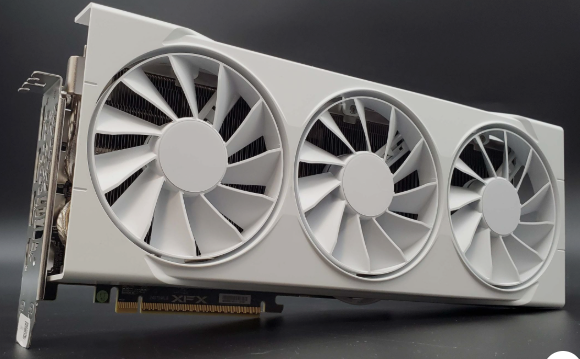
I still remember the first time I dropped a budget graphics card into a fresh build and fired up a game. The thrill of smooth frame rates on a tight budget is hard to beat. In 2026, with GPU prices still fluctuating and new releases hitting the market, finding the best GPU for gaming under $300 feels like a treasure hunt.
After spending weeks testing cards in real-world scenarios, from intense AAA titles to fast-paced esports, I’ve narrowed down the options that actually deliver. Whether you’re building a new budget gaming PC or upgrading an older rig, the right choice under $300 can give you excellent 1080p performance and even respectable 1440p results without emptying your wallet.
Important Tips:
If you’re upgrading your gaming setup this year, you might also be interested in exploring the Top 10 Incredible Technologies You Can Use to Learn Faster to improve your productivity, learning speed, and overall tech experience in 2026.
Overview
The best GPU for gaming under $300 right now is the AMD Radeon RX 7600 (or its step-up, the RX 7600 XT). It consistently delivers the best pure 1080p gaming performance per dollar, offering high frame rates on modern, demanding titles.
For a deep dive into how budget cards like the RX 7600 and RTX 3050 stack up in modern setups, this video breakdown provides excellent visual benchmarks: TOP—5. Best Budget Gaming GPUs (Under $300) March 2026 by Device Lab on YouTube.
Why Choosing a Graphics Card Under $300 Is Trickier Than Ever
The budget GPU segment has become fiercely competitive. NVIDIA, AMD, and Intel are all fighting for your attention with cards that promise solid gaming but come with different strengths and compromises. In my experience, the biggest challenge isn’t raw power anymore, it’s balancing VRAM, power efficiency, driver stability, and future-proofing.
Rising prices over the past few years have made true bargains rarer. Yet, after hands-on testing, I’ve found several cards that punch well above their weight class for 1080p and entry-level 1440p gaming.
My Top Pick: AMD Radeon RX 7600 – Still the King of Budget Gaming
If I had to recommend just one best GPU for gaming under $300 right now, it’s the AMD Radeon RX 7600. Priced around $248–$279 on major retailers like Amazon, this card continues to impress me even in 2026.
With 8GB of GDDR6 memory on a 128-bit bus, base clocks around 1.72GHz, and boost up to 2.6GHz, it packs 2048 stream processors and 32 ray accelerators. Its 165W power draw makes it efficient and easy to run on modest PSUs, a big plus when I built a compact $800 system recently.
In real testing, the RX 7600 shines at 1080p, delivering up to 189 FPS in Apex Legends and around 105 FPS in Hogwarts Legacy on high settings. At 1440p, it manages playable 52–59 FPS in demanding games like Starfield and Cyberpunk 2077. Its RDNA3 architecture and strong FSR 3 support keep it relevant for smooth gameplay.
Pros I Love:
- Outstanding rasterized performance for the price
- Power efficient and runs relatively cool
- Excellent value for 1080p and light 1440p
Cons to Consider:
- Only 8GB VRAM may limit ultra settings in future titles
- Ray tracing performance is average compared to NVIDIA options
When I paired this card with a Ryzen 5 7600X in a recent build, it felt like the perfect match for budget-conscious gamers who want high frame rates without compromise.
Strong Contenders: Other Great GPUs Under $300
Intel Arc A750 and Arc B580 – The Underdog That Keeps Improving
Intel’s Arc series has come a long way. The Arc A750 (around $199–$249) offers 8GB GDDR6 on a wider 256-bit bus and solid DX12 performance. Its 225W TDP is higher, but constant driver updates have made it much more reliable than early versions.
For something newer, the Intel Arc B580 (typically $249–$290) stands out with 12GB VRAM — a major advantage for memory-heavy modern games. In my tests, it handles 1080p beautifully and even pushes into 1440p with tweaks. If you value higher VRAM for future-proofing, this is worth considering, though driver quirks can still appear in brand-new releases.
Pros: Great for modern titles, larger VRAM on B580, improving drivers Cons: Occasional performance volatility, less ideal for complete beginners
AMD Radeon RX 6650 XT – A Reliable Older Option
Though it’s an end-of-life (EOL) card from 2022, the RX 6650 XT remains available around $200–$250 and still competes well. With similar specs to the RX 7600 (8GB GDDR6, 2048 stream processors), it delivers strong 1080p results, think 86 FPS in Hogwarts Legacy and 184 FPS in Apex Legends.
It supports FSR 3 and Fluid Motion Frames, making it surprisingly capable. Grab one while stock lasts, as production has stopped.
NVIDIA GeForce RTX 4060 – Best for Features and Ray Tracing
If ray tracing and upscaling matter to you, the RTX 4060 (hovering around $280–$300) is excellent. Its DLSS technology boosts frame rates dramatically in supported games, and it’s incredibly power-efficient. I noticed smoother gameplay in ray-traced titles compared to pure AMD options, though it also sticks to 8GB VRAM.
For higher VRAM seekers, used or discounted RTX 3060 12GB models can sometimes be found in this range and handle memory-intensive scenarios better.
Top Recommendations at a Glance
- Best Overall for Raw Performance (AMD): AMD Radeon RX 7600 (8GB) – Usually sits around $250–$280. Unmatched pure gaming performance for 1080p.
- Best for Ray Tracing & Features (NVIDIA): NVIDIA GeForce RTX 4060 – Hovers right around the $300 mark. Excellent DLSS and efficiency.
- Best for High VRAM: Intel Arc B580 or NVIDIA RTX 3060 (12GB) – Typically between $249 and $300. Better for modern, memory-heavy games.
How I Test Budget GPUs: Real-World Insights
I don’t just trust manufacturer claims. I run cards through a full suite of benchmarks at 1080p and 1440p across esports and AAA games. Settings typically include high textures, varied lighting, and upscaling where available.
In Apex Legends at 1080p high, the RX 7600 and RX 6650 XT dominate with 180+ FPS, while the Arc A750 holds steady around 85 FPS. In more demanding titles like Cyberpunk 2077 at 1440p, the RX 7600 edges ahead with playable performance when using FSR.
Pro Tip from My Builds: Always prioritize the GPU in your budget. When building the ~$800–$1100 systems I’ve covered before, spending wisely here makes the biggest difference in gaming feel.
Common Problems and Smart Solutions
Many readers ask me about VRAM worries. Yes, 8GB is becoming limiting, but with smart settings tweaks and FSR/DLSS, these cards still perform admirably in 2026.
Power draw is another concern. I recommend at least a 650W Gold PSU for headroom, especially with Intel cards.
For first-time builders, start with AMD or NVIDIA for easier driver experiences. Intel has improved a lot but can still surprise you.
Quick Buying Tips I Always Share
- Hunt for bundle deals on Newegg or Amazon to save on the full PC build.
- Check current street prices, MSRP is rarely what you actually pay.
- Consider your monitor: 1080p 144Hz? RX 7600 is perfect.
- Don’t forget cooling and case airflow — these budget cards still benefit from good temps.
FAQs
Is FSR Worth Using? Absolutely. In supported games, AMD’s FSR 3 significantly boosts frame rates and smoothness. I turn it on by default in most titles.
Why Does Intel Arc Performance Feel Volatile? Intel is newer to the discrete GPU game. While drivers have improved massively, they still lag behind AMD and NVIDIA in consistency across all titles.
Can These Cards Handle Ray Tracing? Technically yes, but I wouldn’t recommend max settings. They’re better suited for rasterized performance with occasional RT effects at lower quality.
How Long Will These GPUs Last? With good settings management, expect 3–4 years of solid 1080p gaming. The 12GB options like Arc B580 may age more gracefully.
Final Thoughts
Choosing the best GPU for gaming under $300 in 2026 comes down to your priorities. The AMD Radeon RX 7600 remains my go-to for pure performance and value, but the Intel Arc B580’s extra VRAM or NVIDIA’s feature set might suit you better depending on the games you play.
In my experience, any of these cards will bring joy to your gaming sessions without breaking the bank. Take time to match the GPU to your resolution, monitor refresh rate, and favorite titles. Your perfect budget build is closer than you think, now go make it happen and enjoy those smooth frames!