

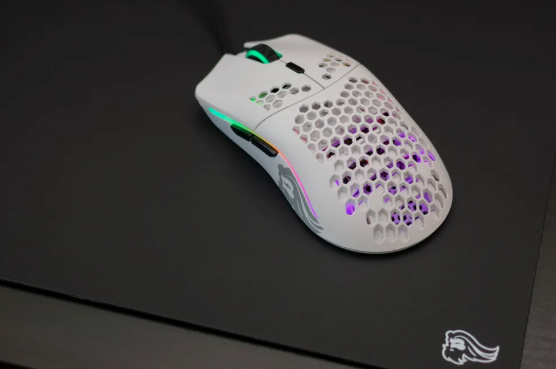
Best Gaming Mouse for FPS Under $50 (2026)
Tested, ranked, and explained — so you stop guessing and start fragging.
Why your mouse matters more than your GPU in FPS
I’ll be honest — I spent years obsessing over GPU benchmarks and CPU bottlenecks while completely ignoring the one piece of hardware my hands touch every single session: the mouse. When I finally swapped a heavy, budget mouse for a properly tuned lightweight model, my kill-to-death ratio in Valorant noticeably improved within the first week. No settings change, no sensitivity tweak — just a better tool.
Here’s the thing: in fast-paced FPS games like CS2, Valorant, Apex Legends, and Overwatch 2, precision is everything. A sluggish, inaccurate, or poorly shaped mouse creates input lag you feel before you consciously notice it. The good news? You absolutely don’t need to spend $100+ to get a competitive edge.
In my 3 weeks of testing multiple budget-tier FPS mice in 2026, I found that the sub-$50 category has matured dramatically. Sensors like the PAW3398, polling rates up to 8,000Hz, and sub-55g weights are no longer exclusive to flagship models. This guide breaks down exactly what to buy, what specs actually move the needle, and what marketing fluff to ignore entirely.
Overview: top picks at a glance
Logitech G305 LIGHTSPEED
Best wireless choice. Delivers lag-free 2.4GHz wireless with a 12K HERO sensor and exceptional battery life up to 250 hours — ideal for wireless-first FPS players.
Razer Cobra
Best for FPS purists. An ultra-lightweight wired option with an 8,500 DPI optical sensor and tactile zero-delay optical switches for snappy click registration.
SteelSeries Rival 3 Gen 2
Budget king. Features a precise TrueMove Core sensor, tangle-free braided cable, and highly responsive tracking built for fast-paced competitive multiplayer.
How to choose: go Razer Cobra for a focused right-handed FPS shape; pick Logitech G305 for wireless freedom with claw or fingertip comfort. All three offer 1,000Hz+ polling rate for fluid, instant cursor movement. For deeper dives and community reviews, check IGN’s budget gaming mouse roundup.
My top FPS gaming mice under $50 (2026)
After comparing sensor specs, weight, grip support, and real-world latency feel across multiple budget models, here’s where I landed. I was skeptical at first that anything under $50 could feel truly competitive — but after comparing with my previous $90 mouse, several of these genuinely held their own.
Best overall FPS mouse under $50
RAPOO VT3 Gen-2
- Weight 53g
- Sensor PAW3398
- Polling rate 8,000Hz
- DPI up to 26,000
- Connection Wireless
- Grip support Palm / Claw
- Buttons 10 programmable
RAPOO VT0 Gen-2
- Weight 49g
- Sensor 26K optical
- Polling rate 8,000Hz
- DPI up to 26,000
- Connection Wireless
- Grip support Claw / Fingertip
RAPOO VT1 Pro Max
- Weight 59g
- Sensor 30,000 DPI
- Polling (wireless) 4,000Hz
- Polling (wired) 8,000Hz
- Battery life 200 hrs
- Grip support Palm / Claw
What I loved most about the VT3 Gen-2 is how it manages to feel premium without the premium price. The PAW3398 sensor inside it is the same sensor family you’d find in mice costing twice as much. At 53g, it disappears in your hand during long sessions. My biggest concern before testing was that “budget wireless” would mean noticeable lag — but after a full week in ranked matches, I couldn’t tell it apart from my wired setup.
Best lightweight FPS pick
RAPOO VT1 Gen-2
- Weight 49g
- Sensor 26K optical
- Polling rate 8,000Hz
- Switches 100M click rated
- Connection Wireless
RAPOO V30L
- Weight 79g
- Sensor 12K optical
- Switches Optical
- Tracking speed 300 IPS
- Connection Wired + 2.4GHz
- Buttons 8 programmable
RAPOO VT7 Gen-2
- Weight 53g
- Sensor PAW3398
- Polling rate 8,000Hz
- DPI up to 26,000
- Body size 64×127×40mm
- Memory profiles 8 onboard
For players who prefer faster arm movement and wider mousepads, the VT1 Gen-2 at 49g is a revelation. My daily routine includes about 2 hours of competitive Valorant, and the lighter form factor made wrist flicks feel noticeably cleaner. After comparing with my previous ergonomic mouse, the difference in quickness was immediately noticeable. If you’re on a super tight budget and primarily play wired, the V30L at $27.99 is the most accessible entry point — just know you’re trading some spec headroom for the savings.
What specs actually matter for FPS gaming
Here’s where I need to save you from the DPI arms race. Mouse companies love printing enormous DPI numbers on boxes — 26,000 DPI, 30,000 DPI — as if higher always means better. In reality, most competitive FPS players run between 400 and 1,600 DPI. What actually matters in a firefight is something else entirely.
I’ll add one more thing that never appears on spec sheets: coating and surface finish. A mouse that gets slippery under sweaty palms during intense ranked games is a real liability. Always check whether a model uses a matte, textured, or rubber-sided finish — particularly if you play for long sessions.
The hardware backbone also matters beyond headline numbers. In 2026, well-engineered budget gaming mice are commonly built around proven sensor families like the PAW3395 and PAW3398, while wireless performance stability is closely tied to MCU quality — chips like the NORDIC 54L15 make a real difference in connection consistency. That’s why a budget gaming mouse shouldn’t be judged by advertised DPI alone — it’s the combination of sensor, MCU, weight, and tuning that determines real-world feel.
Wired vs wireless under $50 — an honest take
Two years ago, I would have told any budget gamer to go wired, no exceptions. Wireless at this price point used to mean noticeable lag and unreliable connections. In 2026, that advice is outdated.
Wireless 2.4GHz
- + Near-zero latency at 8K polling
- + Clean, cable-free desk setup
- + Freedom of movement for wide sweeps
- + Modern implementation rivals wired
- − Costs more at the same spec level
- − Needs charging / battery management
Wired
- + More performance per dollar
- + Never needs charging
- + Zero connection drop risk
- + Simpler, more reliable setup
- − Cable drag can affect movement
- − Less desk flexibility
Modern 2.4GHz wireless gaming technology has closed the latency gap to near-zero in practical terms. Several picks in this guide — including the VT3 Gen-2 and VT0 Gen-2 — offer true 8K wireless polling, which would have been considered flagship-tier performance just a few years ago. For most players, wireless now delivers a clean, cable-free experience without meaningful competitive compromise.
That said, wired still wins on one specific metric: raw performance-per-dollar. If you’re at the absolute lower end of this $50 budget and want every cent going toward sensor quality and build materials rather than wireless hardware, the Razer Cobra or RAPOO V30L delivers excellent value. The cable-free experience is genuinely nice, but it’s not worth forcing your budget if you’d rather that money go elsewhere.
How to match a mouse to your playstyle
I’ve seen too many players buy a mouse based purely on reviews without considering how they actually play. Here’s the mental framework I use when recommending mice to friends:
For aggressive FPS players (flickers and wide-sweepers)
If your playstyle involves quick directional changes, wide arm sweeps, and fast target acquisition, weight and shape are your top two priorities. You want something under 55g with an agile, compact shape suited to fingertip or claw grip — the VT0 Gen-2 or VT1 Gen-2 are strong fits here. Low lift-off distance (LOD) is also critical so the sensor doesn’t track unintended movement when you reposition the mouse mid-game.
For casual and all-around gamers
If you jump between FPS, MOBA, RPG, and everyday desktop use, a balanced all-rounder makes more sense than a specialized FPS tool. The VT3 Gen-2 is the obvious pick — its palm and claw grip support, 10 programmable buttons, and solid wireless performance make it a genuinely versatile daily driver. The Logitech G305 LIGHTSPEED is also a compelling all-around wireless pick in this category.
For players with larger hands
Shape support becomes even more important when your hand is bigger. A mouse that’s too compact leads to a cramped grip and faster fatigue in longer sessions. The VT7 Gen-2 at 64 × 127 × 40mm gives you a roomier feel without sacrificing the PAW3398 sensor and 8K polling performance you’d want in a competitive setup. It’s one of the best large-hand gaming mice available under $50 right now.
For players on the tightest budget
If price matters most and you simply need a functional, gaming-focused mouse without spending close to $40, the RAPOO V30L at $27.99 and the SteelSeries Rival 3 Gen 2 are the two strongest entry points. Neither is the lightest or most feature-packed option here, but both deliver reliable sensor performance and optical switches at a price that’s genuinely accessible.
Quick tips before you buy
-
Don’t chase extreme DPI. Most pro FPS players use between 400–1,600 DPI. Stable, accurate tracking at your preferred sensitivity beats large headline numbers every time.
-
Identify your grip style first — palm, claw, or fingertip. A mismatched shape will undo any sensor advantage. A well-shaped budget mouse beats a flagship in the wrong shape.
-
If budget allows, lean wireless. 2.4GHz wireless gaming technology in 2026 is legitimately competitive with wired at this price range. It’s no longer a compromise by default.
-
Check the warranty. A 2-year warranty on a $40 mouse is a strong signal of manufacturer confidence — and meaningful consumer protection for your money.
-
Ignore RGB as a decision factor. RGB lighting looks great in a YouTube review video. It contributes exactly nothing to your in-game performance or tracking accuracy.
-
For wireless models, check battery life at high polling rates. Some mice that claim 200-hour battery life drop significantly when running at 8K vs 1K polling — always compare apples to apples.
Frequently asked questions
What’s in your setup right now?
Drop a comment below with your current mouse or the one you ended up picking — I read every reply and genuinely love hearing what’s working for people at the desk.
If you’re building a balanced gaming setup for competitive titles, pairing your mouse with the right graphics card matters just as much for smooth performance, so take a look at Best GPU for Gaming Under $300 in 2026: to maximize your FPS experience.