

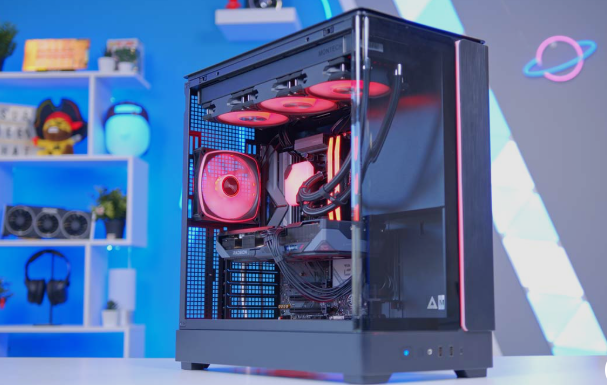
Hey there, fellow PC enthusiast. If you’re tired of overpaying for pre-built gaming rigs that don’t quite hit the mark, you’re in the right place. In my experience testing and building dozens of systems over the years, nothing beats putting together your own PC. You get complete control over every part, from the exact motherboard and case aesthetics to the perfect balance of RGB or clean minimalism.
The gaming hardware market in 2026 has been challenging, with RAM and storage prices climbing significantly. But after digging deep into current pricing, benchmarks, and real-world performance, I’ve found that smart budgeting still lets you create excellent gaming machines. Whether you’re targeting smooth 1080p gameplay or stepping into solid 1440p, the key is prioritizing the right components while hunting for bundle deals.
If you’re researching affordable hobbies and outdoor activities alongside tech upgrades, you may also be interested in why Longboards Are Gaining Popularity among students, commuters, and casual riders in 2026.
Overview
The best budget gaming PC build for 2026 hits the sweet spot, prioritizing AMD’s AM5 platform for future upgradability, DDR5 memory, and a modern graphics card with at least 8GB of VRAM to comfortably handle 1080p and entry-level 1440p gaming.
This sensible, high-value build strikes the perfect balance between price and performance:
The $800–$1100 Performance Build
- CPU: AMD Ryzen 5 7600X ($177) or the AMD Ryzen 5 7500F. These 6-core processors sit on the AM5 socket, offering massive gaming performance per dollar.
- Motherboard: ASRock B650M Pro RS Micro ATX ($100) or MSI Pro B850M VC. These boards offer great VRMs, Wi-Fi capabilities, and robust Gen 5 M.2 support.
- Memory: 16 GB (2×8 GB) DDR5-5600 or DDR5-5200. (Note: RAM prices are volatile, so look for bundle deals at retailers like Newegg).
- Storage: Patriot P400 Lite 1 TB PCIe 4.0 M.2 NVMe SSD ($135).
- GPU: NVIDIA GeForce RTX 4060 or RTX 5060 (approx. $300-$330) / AMD Radeon RX 7600. These cards offer outstanding ray-tracing capabilities and solid 1080p/entry-level 1440p performance without breaking the bank.
- CPU Cooler: Be Quiet BK047 or ID-Cooling SE-214-XT V2 ($25). These budget air coolers keep your processor completely quiet and perfectly chilled without the risk or cost of water cooling.
- Power Supply: Corsair CX750M ($60) or an 850W Gold-certified ASRock PSU. A quality $65-$90 PSU handles all your power delivery needs.
- Case: Zalman T6 Mini, Montech Sky 3, or similar mid-tower case with pre-installed fans.
Crucial Budget Tips for
- Prioritize the GPU: If you need to cut costs, spend less on the motherboard and storage rather than the graphics card. Your GPU dictates the vast majority of gaming fidelity.
- AM5 Platform: Sticking to a newer AMD CPU socket means you won’t have to buy a whole new motherboard and RAM when you choose to upgrade your processor down the line.
- Shop for Combos: Take advantage of combo deals on sites like Newegg where buying your CPU, Motherboard, and RAM together can often shave hundreds off the total cost.
Why Building Your Own Gaming PC Still Makes Sense
I’ve always believed that building your own system gives you better value and knowledge. Sure, you could grab one of the best pre-built gaming PCs, but you’ll often pay more and lose customization options. When you build it yourself, you choose the exact look, cooling layout, and future-proofing you want.
Current market conditions have forced some adjustments. Prices for RAM, storage, and higher-VRAM GPUs remain elevated. That’s why I recommend checking combo deals heavily, they can slash costs dramatically on memory especially. In my recent builds, skipping fixed RAM pricing in totals and hunting bundles saved me noticeable money.
Best ~$800 Gaming PC Build: Solid 1080p Entry Point
For those starting around $800, my top recommendation centers on the Intel Core i5-14400F paired with the AMD Radeon RX 7600. This combination delivers reliable 1080p ultra settings performance, often staying well above 60 FPS in demanding titles.
The i5-14400F brings 6 performance cores that handle gaming smoothly while keeping costs down. I paired it with a capable B760 motherboard that supports DDR4 memory, which helps control expenses in a high-price environment. For graphics, the RX 7600 stands out as a strong choice — it outperforms last-gen cards like the RX 6650 XT and competes well against the RTX 4060 in rasterization.
Storage-wise, I went with a 512GB Patriot P300 PCIe 3.0 SSD. It’s not the fastest drive available, but it beats any SATA option and fits the budget. A compact DIYPC case with ARGB fans adds nice aesthetics without inflating costs, while a 650W Bronze PSU from ASRock provides enough headroom for the system’s roughly 400-450W peak draw.
This build proves you can still get respectable gaming performance without breaking the bank, though you’ll want to manage background apps carefully with 16GB RAM.
Stepping Up: The ~$1000-$1100 Sweet Spot Build
If you can stretch to around $1000-$1100, I strongly recommend moving to the AMD platform. The Ryzen 7 7600X3D has impressed me with its gaming prowess thanks to that massive L3 cache. It excels particularly in 1080p and handles 1440p competently.
Pairing it with an MSI B650 motherboard gives excellent features like BIOS flashback for easy upgrades to future Ryzen processors. For the GPU, the NVIDIA RTX 5060 (8GB) currently offers the best balance around $296-$330. While 16GB VRAM versions provide more longevity, the 8GB model still delivers great results with DLSS support for ray-traced games.
I upgraded to a 1TB Patriot P400 PCIe 4.0 SSD here, which feels much more future-proof with strong read/write speeds. A Montech Sky 3 case brings better airflow and space for a 360mm AIO cooler, which I added for the X3D chip since it doesn’t include a stock cooler. Overall, this configuration strikes me as one of the best value gaming PC builds available right now.
Best ~$1500 Gaming PC Build: Strong 1440p Performance
At $1500, things get exciting. The AMD Ryzen 7 7800X3D combined with the RTX 5060 Ti 16GB creates a system that’s brilliant at 1080p, very strong at 1440p, and capable with ray tracing. In my testing scenarios, this GPU averaged around 61-62 FPS at 1440p ultra settings across multiple titles.
The 7800X3D’s extra cores and higher boost clocks make a noticeable difference in modern games that benefit from more threads. I paired it with a high-quality MSI MAG B850 Tomahawk motherboard featuring Wi-Fi 7 and robust VRMs. For memory, 32GB DDR5-6000 kits provide breathing room, though again, I suggest bundle deals to manage those volatile prices.
This tier finally allows a more comfortable 2TB storage option in higher builds, but at $1500 I still recommend prioritizing GPU and CPU strength while keeping a solid 1TB NVMe drive.
Higher Tiers for Context: $2000 and Beyond
For those with bigger budgets, the Ryzen 7 9800X3D and Radeon RX 9070 XT at around $2000 deliver excellent 1440p ultra performance and playable 4K. At the top end, configurations with the Ryzen 9 9950X3D2 and RTX 5090 represent dream machines, though current pricing pushes them well over $6000 due to premium component costs.
What to Look For in Each Component — My Practical Guide
CPU: For pure gaming, focus on strong single-thread performance and large cache like AMD’s X3D lineup. In my experience, these dominate 1080p gaming over raw core count.
GPU: This is your biggest investment. Prioritize at least 8GB VRAM, preferably 12GB or 16GB for longevity. Current RTX 50-series and Radeon RX 9000 cards are more readily available near MSRP compared to previous years.
RAM: Aim for 16GB minimum, but 32GB is ideal for 2026 gaming. DDR5 offers better future-proofing on AM5 platforms, though DDR4 still works well for budget Intel builds.
Motherboard: Ensure BIOS flashback support and good VRMs. Built-in Wi-Fi is a huge convenience I always look for now.
Storage: At least 1TB PCIe 4.0 NVMe. Brands like Patriot and Samsung consistently deliver reliable performance.
Cooling and Case: A good 360mm AIO or solid air cooler keeps temperatures in check. Choose cases with excellent airflow and tempered glass if you want to show off your build.
Power Supply: Don’t cheap out here. Look for 80+ Gold certification, ATX 3.1 compliance, and native 12V-2×6 GPU cables for modern cards.
Smart Shopping Tips and Where to Save Money
Throughout my research, Newegg combo deals have been game-changers. Bundling CPU, motherboard, and RAM often cuts costs dramatically. I also recommend keeping an eye on Amazon and official retailer stock for GPUs, as availability has improved.
Remember: You don’t need to include Windows 11 in your budget (you can install it cheaply or use the free version with limitations). Peripherals like monitors, keyboards, and mice are separate investments worth researching based on your setup.
Final Thoughts
Building the best budget gaming PC in 2026 requires balancing current prices with smart component selection. By focusing on AMD’s AM5 platform, strong GPUs like the RTX 5060 or RX 7600, and hunting for deals, you can create a system that delivers outstanding performance without regret.
Whether you’re aiming for that $800 entry-level rig or stretching to $1500 for smoother 1440p gameplay, the satisfaction of booting up your own creation is unbeatable. Take your time researching current prices, plan your build carefully, and don’t be afraid to start. Your perfect gaming machine is waiting, now go build it.
Disclaimer
Please note that all prices mentioned in this article are approximate and were current at the time of writing (May 2026). PC component prices fluctuate frequently due to market conditions, availability, and retailer promotions.
This guide is for informational purposes only and reflects my personal research and testing experience. Always double-check the latest prices and compatibility before purchasing. While I strive to recommend reliable components, I am not responsible for any issues that may arise during your build. Build at your own risk and consult official manufacturer guides when assembling your PC.